
Notice: Function _load_textdomain_just_in_time was called incorrectly. Translation loading for the tutor domain was triggered too early. This is usually an indicator for some code in the plugin or theme running too early. Translations should be loaded at the init action or later. Please see Debugging in WordPress for more information. (This message was added in version 6.7.0.) in /home/jsuwwmcrhosting/public_html/wp-includes/functions.php on line 6260

Notice: Function _load_textdomain_just_in_time was called incorrectly. Translation loading for the woo-checkout-field-editor-pro domain was triggered too early. This is usually an indicator for some code in the plugin or theme running too early. Translations should be loaded at the init action or later. Please see Debugging in WordPress for more information. (This message was added in version 6.7.0.) in /home/jsuwwmcrhosting/public_html/wp-includes/functions.php on line 6260

Notice: Function _load_textdomain_just_in_time was called incorrectly. Translation loading for the addonify-floating-cart domain was triggered too early. This is usually an indicator for some code in the plugin or theme running too early. Translations should be loaded at the init action or later. Please see Debugging in WordPress for more information. (This message was added in version 6.7.0.) in /home/jsuwwmcrhosting/public_html/wp-includes/functions.php on line 6260

Notice: Function _load_textdomain_just_in_time was called incorrectly. Translation loading for the woocommerce domain was triggered too early. This is usually an indicator for some code in the plugin or theme running too early. Translations should be loaded at the init action or later. Please see Debugging in WordPress for more information. (This message was added in version 6.7.0.) in /home/jsuwwmcrhosting/public_html/wp-includes/functions.php on line 6260

Notice: Function _load_textdomain_just_in_time was called incorrectly. Translation loading for the cartflows domain was triggered too early. This is usually an indicator for some code in the plugin or theme running too early. Translations should be loaded at the init action or later. Please see Debugging in WordPress for more information. (This message was added in version 6.7.0.) in /home/jsuwwmcrhosting/public_html/wp-includes/functions.php on line 6260
Tìm hiểu PlantPAx 4 Analog Outputs
  1. Giới thiệu PlantPAx 4 Analog Outputs

Với PlantPAx 4 Analog Outputs bạn sẽ “scale” thông tin analog trở lại thành dữ liệu thô (raw data) và gửi đến mô-đun Analog Output.
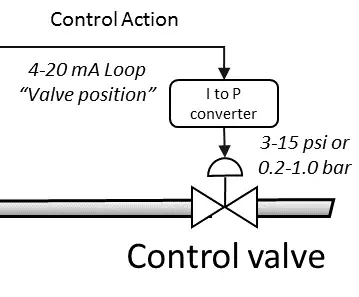
Hình 1. Ví dụ điều khiển 1 van yêu cầu 4-20mA

Ví dụ như: Chúng ta có một van yêu cầu 4-20mA. Tuy nhiên giao diện vận hành được thiết lập theo tỉ lệ phần trăm. Ở trường hợp này, chúng ta có thể chia tỉ lệ 0–100% thành 4000–2000 dữ liệu thô (raw data) trước khi gửi giá trị (value) đến kênh analog output. Đây là một ví dụ để giúp chúng ta hiểu rõ hơn về PlantPAx 4 Analog Outputs trong thực tế có thể khác đôi chút. Ví dụ Như kênh đầu ra dạng điện áp yêu cầu dữ liệu thô (raw data) từ 0 đến 32767. Dữ liệu thô này sẽ gửi điện áp từ 0-10V đến thiết bị trường.

2. Import the Instruction: P_AOut

Bây giờ để thực hành với PlantPAx 4 Analog Outputs chúng ta sẽ tiến hành import Instruction “P_AOut” vào Studio 5000.

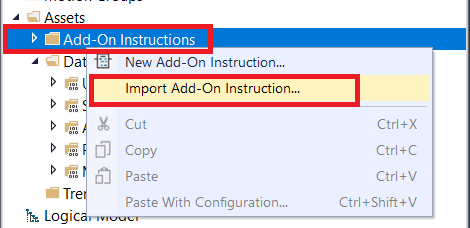
Click chuột phải ở “Add On Instructions”, ➜ và chọn “Import Add On Instruction”
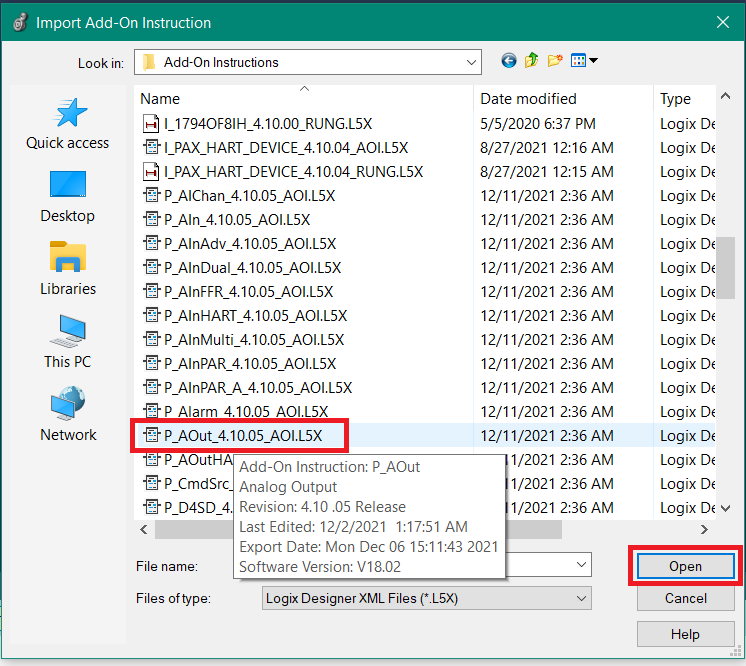
Chọn vị trí lưu thư viện Add ➜ Chọn P_AOut ➜ Open
3. Viết Chương trình

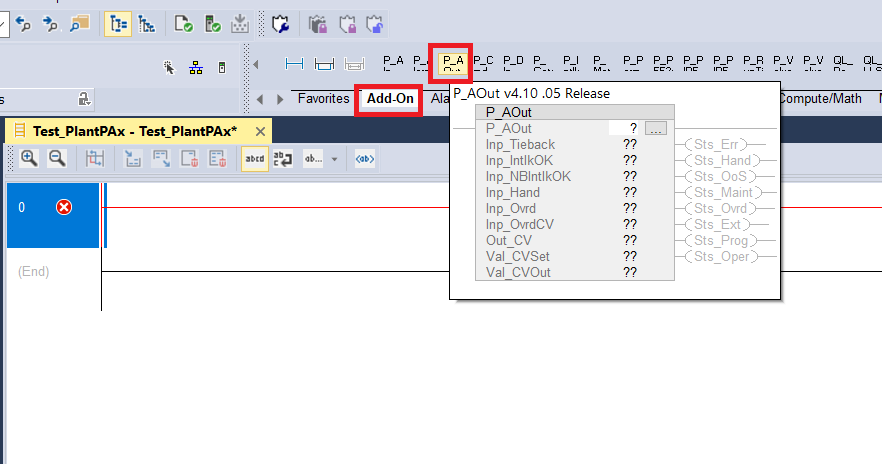
Sau khi chúng ta đã Import “Instructions” của P_AOut. Bây giờ chúng ta có thể chúng ta có thể thêm instruction vào chương trình (logic). Click vào mục “Add-on” ➜ Chọn “P_AOut”.
Để lại một bình luận

Email của bạn sẽ không được hiển thị công khai. Các trường bắt buộc được đánh dấu *