
Notice: Function _load_textdomain_just_in_time was called incorrectly. Translation loading for the tutor domain was triggered too early. This is usually an indicator for some code in the plugin or theme running too early. Translations should be loaded at the init action or later. Please see Debugging in WordPress for more information. (This message was added in version 6.7.0.) in /home/jsuwwmcrhosting/public_html/wp-includes/functions.php on line 6260

Notice: Function _load_textdomain_just_in_time was called incorrectly. Translation loading for the woo-checkout-field-editor-pro domain was triggered too early. This is usually an indicator for some code in the plugin or theme running too early. Translations should be loaded at the init action or later. Please see Debugging in WordPress for more information. (This message was added in version 6.7.0.) in /home/jsuwwmcrhosting/public_html/wp-includes/functions.php on line 6260

Notice: Function _load_textdomain_just_in_time was called incorrectly. Translation loading for the addonify-floating-cart domain was triggered too early. This is usually an indicator for some code in the plugin or theme running too early. Translations should be loaded at the init action or later. Please see Debugging in WordPress for more information. (This message was added in version 6.7.0.) in /home/jsuwwmcrhosting/public_html/wp-includes/functions.php on line 6260

Notice: Function _load_textdomain_just_in_time was called incorrectly. Translation loading for the woocommerce domain was triggered too early. This is usually an indicator for some code in the plugin or theme running too early. Translations should be loaded at the init action or later. Please see Debugging in WordPress for more information. (This message was added in version 6.7.0.) in /home/jsuwwmcrhosting/public_html/wp-includes/functions.php on line 6260

Notice: Function _load_textdomain_just_in_time was called incorrectly. Translation loading for the cartflows domain was triggered too early. This is usually an indicator for some code in the plugin or theme running too early. Translations should be loaded at the init action or later. Please see Debugging in WordPress for more information. (This message was added in version 6.7.0.) in /home/jsuwwmcrhosting/public_html/wp-includes/functions.php on line 6260
Tự học HMI Pro-face | Bài 2. Hướng dẫn cài đặt phần mềm lập trình GP-Pro EX

⚠️Lưu ý quan trọng: Do vấn đề tôn trọng quyền sở hữu trí tuệ nên trong bài viết này chỉ hướng dẫn các bạn thực hiện cài đặt và sử dụng cách chính thống. Nếu có key mua từ hãng thì các bạn có thể sử dụng full tính năng phần mềm. Trong trường hợp không có key thì các bạn có thể dụng thử (trial) 24 tiếng liên tục mở phần mềm (tắt phần mềm sẽ không tính).

1. Tải phần mềm

—  Để cài đặt phần mềm mới nhất các bạn có thể truy cập tại đây hoặc thực hiện tuần tự các bước sau:

Bước 1:

• Truy cập proface.com → tiến hành đăng nhập tài khoản (nếu không có bạn có thể tạo mới tài khoản)

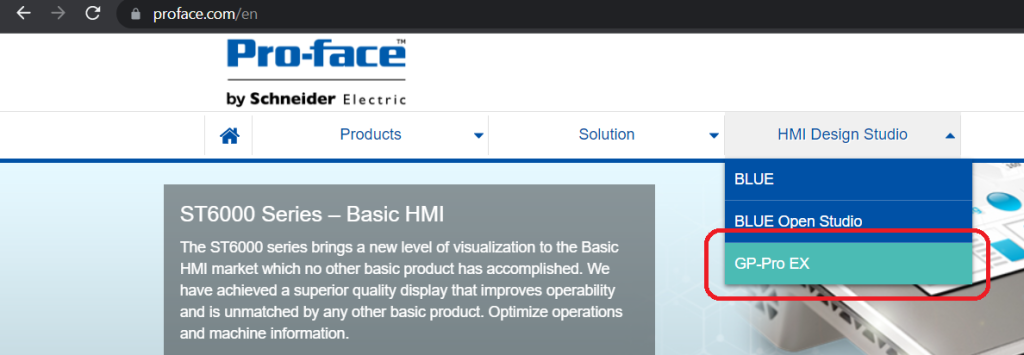
• Sau đó trong mục HMI Design Studio → Chọn GP-Pro Ex
. . . . .

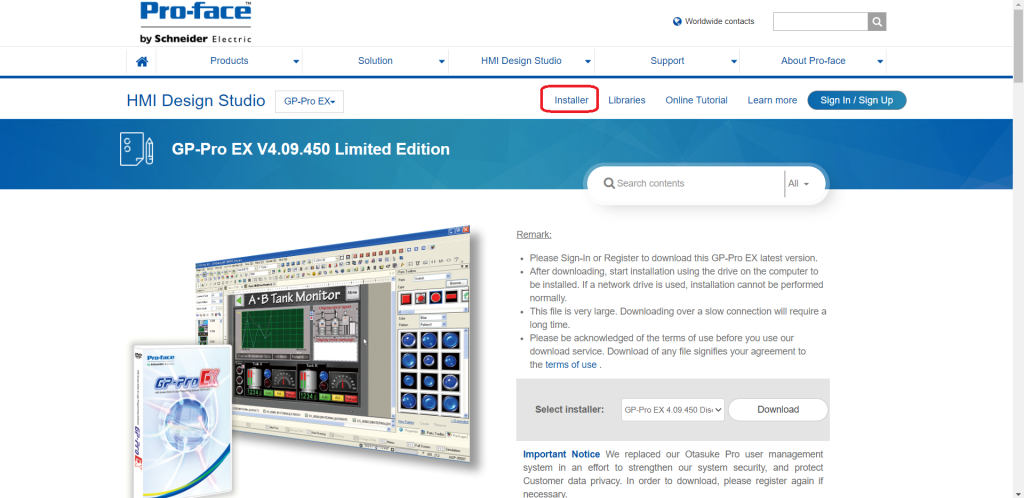
Bước 2.Tại trang GP-Pro Ex → chọn Installer
. . . . .

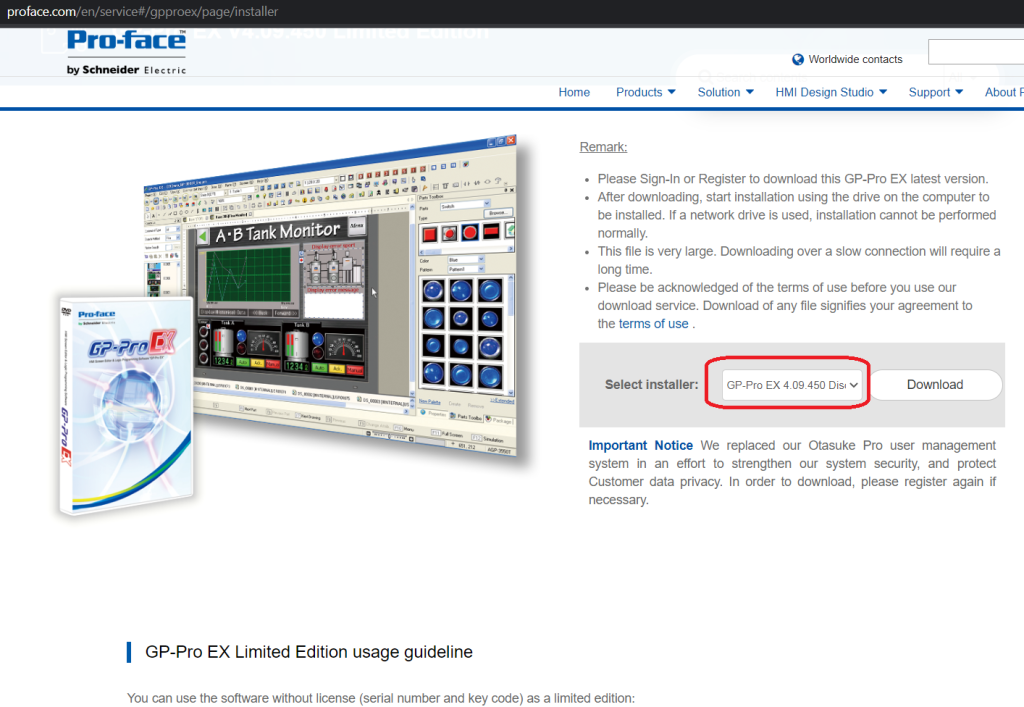
Bước 3. Lựa chọn phiên bản bạn cần và bấm vào Download
2. Cài đặt phần mềm

Sau khi cài đặt xong phần mềm các bạn có thể cài đặt theo các bước sau:

👉Xem chuỗi bài viết Tự học HMI Pro face: vncat.vn/proface

👉Các tài liệu tham khảo:

  1. se.com
  2. pro-face.com
  3. Industrial PC Flat Panel Monitor

👉 Theo dõi Vietnamcat.com

[aps-counter theme=”theme-4″]

. . . . .

Để lại một bình luận

Email của bạn sẽ không được hiển thị công khai. Các trường bắt buộc được đánh dấu *